
Idol Draw: Coloring Master
JUMBO GAMES StudioCasual
4.642.00 Reviews
- Version
- 0.21
- Installs
- 10.00M
- Age Rating
- Everyone
Screenshots

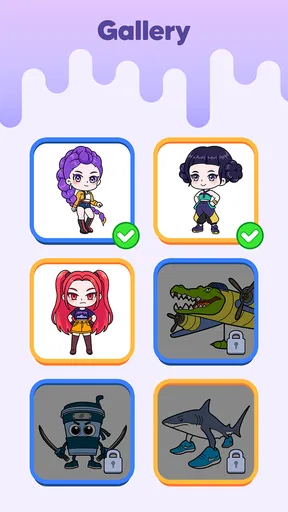

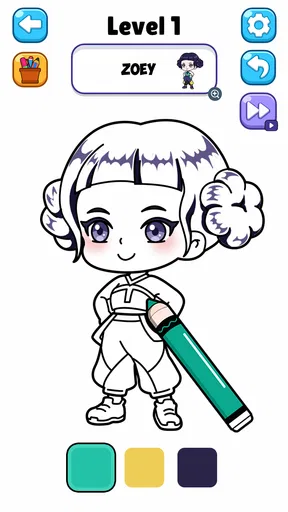



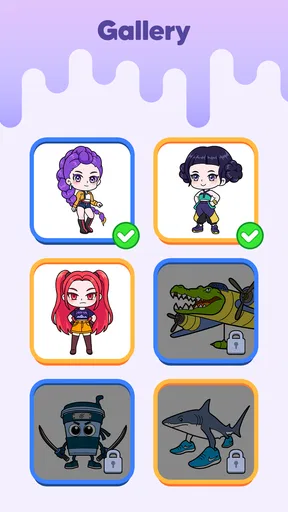
Our Review of Idol Draw: Coloring Master
 Analysis by Appyee
I approached Idol Draw: Coloring Master as a quick, low-pressure drawing game rather than a serious art tool. That distinction matters. Its basic appeal is easy to understand: you draw and color pictures, then enjoy the result. In practice, I found it most interesting when I wanted a short creative break without setting up a canvas, choosing complicated brushes, or learning a demanding interface.
The game comes from JUMBO GAMES Studio and sits in the casual category. It is free to install, rated for Everyone, and available for devices running Android 9 or later. Its current version is 0.20, and the game has already passed ten million installs. Those details make it look like a very accessible pick for families, younger players, and anyone who prefers simple touch-based entertainment over competitive play.
My overall view is positive but measured. The concept is approachable and the coloring focus gives it a calmer rhythm than many casual games. At the same time, players looking for deep drawing tools, a large creative sandbox, or a highly demanding challenge may quickly feel that this is not the right kind of experience. The key question is not whether it is “good” in the abstract, but whether you want guided coloring or open-ended creation.
How I Decided Whether It Was Worth Keeping
I judge whether a casual game deserves a place on my device by looking beyond the first pleasant session: does its central activity still feel satisfying when the novelty wears off, and is it easy to return without turning play into a chore? Here, that means paying attention to how the coloring fits into a routine, rather than expecting every visit to feel new. That question leads naturally to the practical issue of what keeping it installed actually asks of me.
The right expectations make a big difference
Before choosing a coloring game, I usually ask three things: can I understand it immediately, does it feel comfortable in short sessions, and does the creative activity provide enough variety to stay pleasant? Idol Draw: Coloring Master performs best on the first two points. The premise is clear, and the game does not ask me to become an illustrator before I can enjoy it.
The store’s short description, “Idol Draw,” points toward a focused experience rather than a broad collection of unrelated mini-games. I treated that as a useful clue: this is designed around drawing and coloring, not around action, puzzles, or long-term strategy. If you enjoy filling artwork and seeing a finished image take shape, the central loop should be easy to appreciate.
I also considered how well it works in ordinary situations. A game like this needs to be useful when I have only a few minutes, such as while waiting for an appointment or winding down before bed. It does not need the same depth as a drawing application in those moments. What matters is whether opening it feels less demanding than opening a full art program.
What the rating and audience suggest
The game holds a 3.3 average from around two thousand six hundred ratings, alongside thirty-two written reviews. I would read that as a sign to keep expectations balanced rather than as an automatic warning. A rating in that range often means the basic idea works for some players while others run into limitations that matter to them.
The Everyone age rating is important for families deciding what kind of casual game fits a shared device. It suggests a broadly approachable presentation, but parents should still judge the experience according to the child’s patience, comfort with touch controls, and interest in coloring. A simple age label cannot tell you whether a particular child will find the activity engaging for more than a few sessions.
A realistic everyday use case
My most natural use case for this kind of game is a ten-minute break after finishing a routine task. I can open it, work on a picture without committing to a long match, and stop when I feel finished. That makes it more suitable for fragmented free time than a game that expects a continuous session or punishes interruption.
It can also work as a quiet activity for a child who wants to make something but is not ready for a blank page. A guided picture gives the player a starting point, which removes the anxiety of deciding what to draw. I would introduce it as a creative pastime, not as a replacement for learning to draw, because the structure is likely to reward completion more than experimentation.
Where the game earns its place
The strongest advantage is its low entry barrier. I do not need to understand layers, opacity, brush pressure, or complicated color controls before beginning. That simplicity is not a weakness when my goal is relaxation. It lets me focus on the visual result and the small satisfaction of completing an image.
Another strength is the way coloring can create a gentle sense of progress. A blank or unfinished picture gives me a clear task, while the changing image provides immediate feedback. This is different from a conventional puzzle, where the reward comes from finding a solution, and different from a competitive game, where the reward depends on winning. Here, the pleasure comes from gradually making the picture feel complete.
The best reason to choose it is the combination of guided creativity and short-session convenience. That combination is particularly useful for players who enjoy art-themed activities but do not want to invent every image from scratch.
A small workflow that improves the experience
I found it more satisfying to decide on a visual direction before touching the screen. Instead of coloring each area randomly, I first choose whether I want a bright, playful result or a softer, more restrained one. Even with a simple coloring system, that small decision makes the finished picture feel more intentional.
I also recommend treating each picture as a sequence of passes. I start with the largest areas, move to medium sections, and leave tiny details until the end. This reduces accidental visual clutter and makes it easier to notice which parts still need attention. It is a simple habit, but it turns a basic fill-in activity into a more deliberate creative process.
A third useful approach is to stop before the activity becomes repetitive. Because the game is casual, there is no need to force a long session. I would rather finish one picture carefully and return later than rush through several simply to increase a progress count. That is especially helpful for younger players, who may enjoy the sense of completion more than speed.
Where competing categories can fit better
Idol Draw: Coloring Master is not the same as a full drawing application. An art app is the better choice if I want to sketch freely, revise individual strokes, build a personal portfolio, or control the technical appearance of every mark. Those tools usually demand more learning, but they offer much greater ownership of the final image.
It also differs from traditional coloring-book apps that focus primarily on calm repetition. This game’s drawing-oriented identity may appeal more to someone who wants the activity to feel like a game rather than a digital coloring page. On the other hand, a dedicated coloring app may be preferable if I care most about a quiet library of pages and a slower, more meditative routine.
Casual puzzle games are another alternative. They can provide clearer challenge, stronger score goals, and more obvious reasons to replay a level. I would choose one of those when I want to test reactions or problem-solving. I would choose this game when I want the result to look creative without having to compete or solve a complex problem.
For children who want complete freedom, a blank drawing app may ultimately be more rewarding. The trade-off is that an empty canvas can be intimidating. The guided format here is better for a beginner who needs a prompt, while open drawing is better for a player who already has ideas and wants to express them without boundaries.
Limitations I would consider before installing
The main limitation is the same feature that makes the game approachable: the guided format can narrow the creative experience. If I want to place every line myself or create an image from nothing, coloring an existing picture may feel too controlled. The game works best when structure feels helpful rather than restrictive.
Repetition is another possible issue. Coloring naturally has a soothing rhythm, but that rhythm can become predictable if the available artwork does not keep feeling fresh to the player. I would not install it expecting the constant surprise of an action game. Its appeal depends on whether I enjoy repeating a familiar creative routine.
The 3.3 average also tells me not to assume that every player will find the experience equally polished or satisfying. I would pay attention during the first few sessions to whether the controls feel natural and whether the artwork gives me enough reason to continue. Since the game is free, trying it is relatively easy, but time is still a cost if the loop does not suit me.
There is also a difference between “free” and “best value for everyone.” A free casual game can be a great fit when I want a no-commitment activity, but someone who already owns a capable art application may gain more from using the tool they know. Likewise, a player who wants measurable challenge may spend their time better in a puzzle or arcade title.
The cost of switching from another game
Switching to this game is simple if I am coming from another casual title and want something calmer. I do not need to change my expectations toward competition, complex rules, or lengthy sessions. The adjustment is mostly mental: instead of asking whether I can win, I ask whether I like the picture I am building.
The switch is less attractive if I am leaving a full art app. In that case, I would be giving up the freedom and precision that come with a blank canvas in exchange for a more guided activity. That trade can be worthwhile for relaxation, but it is not an upgrade for serious drawing. I would keep a professional or flexible art tool for projects and use this one for quick, low-pressure coloring.
Players moving from coloring books may adapt quickly because the basic satisfaction is familiar: choose areas, apply color, and watch the image develop. The digital format is more convenient when I do not want to carry supplies, although it may not provide the same tactile feeling as paper and physical pencils.
Who should try it first
I would recommend it to casual players who enjoy visual activities, beginners who prefer prompts over empty canvases, and families searching for an Everyone-rated game with a creative angle. It is also a sensible download for someone who wants a free way to fill short breaks without entering a competitive environment.
I would be more cautious if you need advanced artistic control, a strong long-term challenge, or a clearly defined competitive progression. In those cases, a drawing application, a dedicated coloring title, or a puzzle game may be a better match. The decision depends on whether the act of coloring itself is enough to keep you interested.
My recommendation
After weighing the alternatives, I see Idol Draw: Coloring Master as a pleasant, accessible casual game rather than a complete art platform. JUMBO GAMES Studio has chosen a concept that is easy to understand and suitable for short creative sessions. Its free price and broad age rating lower the barrier to trying it, while its ten-million-plus install reach shows that the format has found a substantial audience.
I would install it when I want guided creativity, a quiet break, or a simple activity for a beginner. I would skip it when I want to draw freely, develop technical skills, or chase a demanding challenge. The current version, 0.20, is worth approaching with realistic expectations: enjoy the coloring loop for what it is, and do not judge it by the standards of a full illustration suite.
My final advice is to give it a short trial with one deliberate coloring session. Use broad areas first, reserve details for last, and notice whether the finished image gives you enough satisfaction to return. If it does, this is an easy casual game to keep available. If the guided structure feels limiting almost immediately, switching to a blank-canvas art app will probably serve you better.
For me, the deciding point is simple: choose this game for accessible, guided coloring, not for unrestricted digital art. Within that role, it can be an enjoyable little companion for spare moments, especially when I want to make something without turning the activity into work.
Privacy and Permissions
See what permissions an app requests and how it handles your data.
- Wi-Fi connection information
- view Wi-Fi connections
- Other
- view network connections, full network access, control vibration, prevent device from sleeping, Google Play license check
Verdict
Strengths of Idol Draw: Coloring Master
- Simple controls make coloring accessible for beginners.
- Offline play lets you color without a constant internet connection.
- Short coloring sessions are convenient for quick breaks.
- Bright artwork is suitable for fans of idol-themed designs.
- Progress can be relaxing and helps encourage creative expression.
Limitations of Idol Draw: Coloring Master
- Some artwork or tools may require in-app purchases to unlock.
- Repeated designs can make the experience feel less varied over time.
- Ads may interrupt play, especially between coloring sessions.
- Small details can be difficult to fill accurately on phone screens.
- The app may use noticeable storage for its image and content library.
Other Releases by JUMBO GAMES Studio
View All
Left or Right: Star Girl Style
Casual3.8
Similar Picks in This Category
View All
My Talking Angela
Outfit7 Limited4.2

My Talking Tom
Outfit7 Limited4.3

Pou
Zakeh4.2

My Talking Tom 2: Pet Game
Outfit7 Limited4.3

Candy Crush Saga
King4.6

Bridge Race
Supersonic Studios LTD4.1
Frequently Asked Questions
What is Idol Draw: Coloring Master?
Idol Draw: Coloring Master is a casual coloring game focused on creating artwork inspired by idol-style characters, performers, and fashionable illustrations. After choosing a picture, you fill sections with colors and complete the design at your own pace. It is aimed at players who enjoy relaxing creative activities rather than fast action, difficult puzzles, or competitive gameplay.
Is Idol Draw: Coloring Master free to download and play?
The game can generally be downloaded without an upfront purchase, but the exact free content may vary by version and platform. Some illustrations, tools, color options, or bonus features may be unlocked through optional purchases, advertisements, or progression. Before installing, check the store listing for current pricing, in-app purchase details, and whether the game requires an internet connection for certain content.
Does Idol Draw: Coloring Master require an internet connection?
Basic coloring may be available offline after the necessary game files have been installed, which makes it suitable for short sessions while traveling or away from Wi-Fi. However, advertisements, new picture packs, cloud features, updates, and purchases may require an internet connection. Availability can differ between releases, so users should confirm the current requirements on the official Android or iOS store page.
Is Idol Draw: Coloring Master suitable for children?
The simple coloring mechanics can be approachable for children, teenagers, and adults, especially for users who enjoy character art and creative games. Nevertheless, parents should review the age rating, advertising behavior, privacy information, and in-app purchase settings before allowing a child to play. If the game includes online services or external links, parental controls are recommended for additional protection.
What should I know about ads, purchases, and privacy before downloading?
Like many free-to-play coloring apps, Idol Draw: Coloring Master may use advertising and optional in-app purchases to support its content. Ads can appear between activities or when claiming certain rewards, while purchases may remove limitations or unlock extra artwork. Review the permissions requested by the app and read its privacy policy, particularly if you are concerned about analytics, personalized advertising, or account-related data.
Play our best games!


